> For the complete documentation index, see [llms.txt](https://knowledgebase.offer18.com/llms.txt). Markdown versions of documentation pages are available by appending `.md` to page URLs; this page is available as [Markdown](https://knowledgebase.offer18.com/es/igaming/igaming-postback.md).
# iGaming - Postback
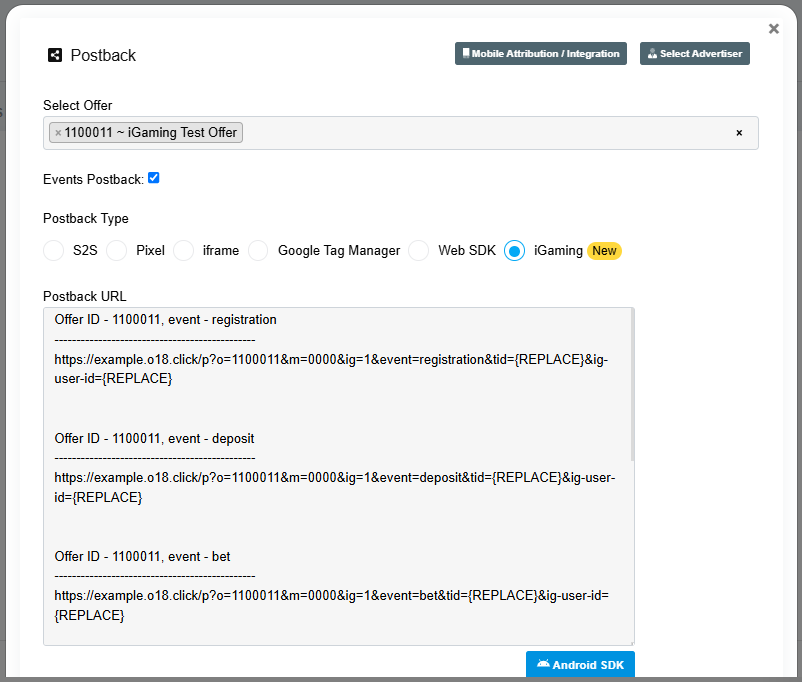
URL de postback / callback que se utilizará como un modo de recibir / extraer registros de conversiones desde la plataforma del anunciante a Offer18.
1. **Ir a Atajos » Postback**
2. **Seleccione el botón de opción etiquetado como 'iGaming'**
{% hint style="info" %}
Por defecto el usuario podrá obtener el Postback de Registro
{% endhint %}
***
### Postback de evento
El Postback de Eventos puede usarse para rastrear otras actividades de iGaming como Depósito, Apuesta, Bono, Retiros
#### Pasos a seguir para el Postback de Eventos
1. **Ir a Atajos » Postback**
2. **Seleccione el botón de opción etiquetado como 'iGaming'**
3. **Seleccionar la Oferta iGaming**
4. **Habilite la casilla etiquetada como 'Event Postback'**
{% hint style="info" %}
* El usuario podrá obtener todas las URL de Postback de Eventos / Actividades
* ID de Usuario (**ig-user-id**) es obligatorio pasarlo en el Postback de iGaming
{% endhint %}