> For the complete documentation index, see [llms.txt](https://knowledgebase.offer18.com/llms.txt). Markdown versions of documentation pages are available by appending `.md` to page URLs; this page is available as [Markdown](https://knowledgebase.offer18.com/ru/set/integraciya-elektronnoi-kommercii/shopify.md).
# Shopify
Чтобы интегрироваться с Shopify, необходимо разместить пиксель изображения Offer18 в панели управления Shopify
### [Получить пиксель изображения](/ru/set/integraciya-postbeka.md)
**Пример :- Пиксель изображения для Shopify для сбора различных значений данных**
{% code overflow="wrap" %}
```
```
{% endcode %}
***
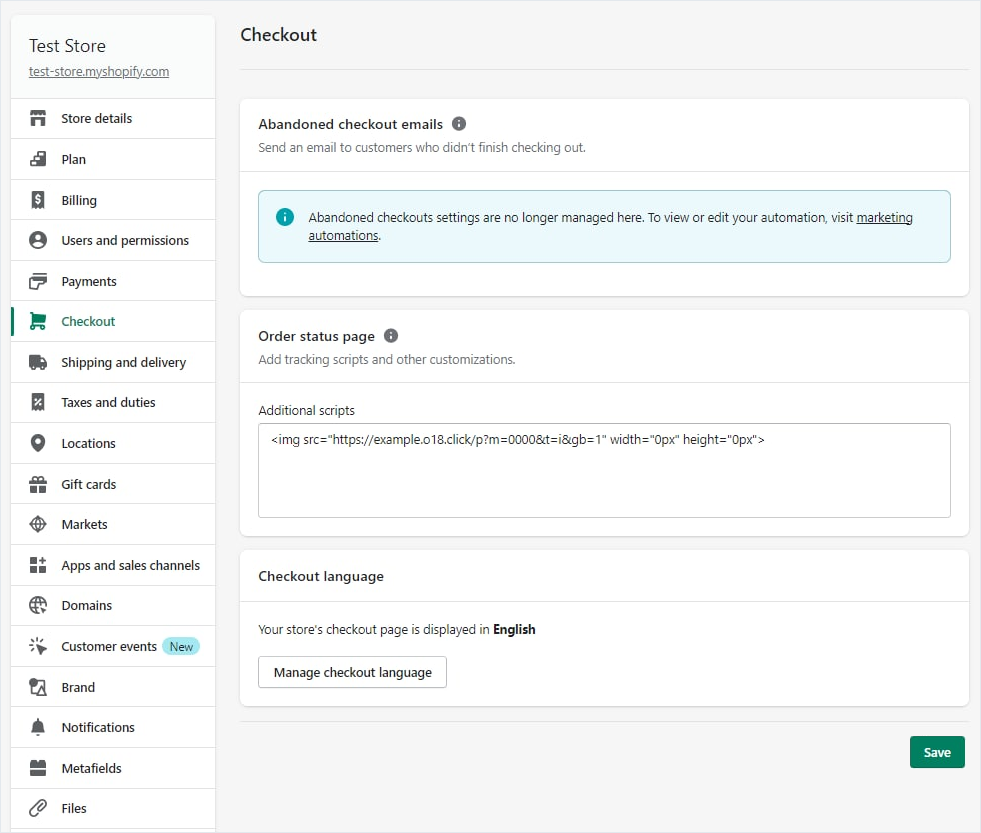
### Интеграция с Shopify
1. Перейти в магазин Shopify
2. Настройки **»** Вкладка оформления заказа
3. Перейдите в раздел обработки заказов
4. Добавьте пиксель изображения в поле "Дополнительный скрипт"
5\. Перейдите в **Сохранить**
***
**Полное руководство - интеграция с Shopify**
{% embed url="" %}