> For the complete documentation index, see [llms.txt](https://knowledgebase.offer18.com/llms.txt). Markdown versions of documentation pages are available by appending `.md` to page URLs; this page is available as [Markdown](https://knowledgebase.offer18.com/zh/wang-luo/dian-shang-ji-cheng/shopify.md).
# Shopify
要与 Shopify 集成,需要在 Shopify 仪表板中放置 Offer18 Image 像素
### [获取图像像素](/zh/wang-luo/hui-chuan-ji-cheng.md)
**示例:- 用于 Shopify 的图像像素以收集各种数据值**
{% code overflow="wrap" %}
```
 ```
{% endcode %}
***
### Shopify 集成
1. 转到 Shopify 商店
2. 设置 **»** 结账 选项卡
3. 转到订单处理 部分
4. 在“附加脚本”字段中添加图像像素
```
{% endcode %}
***
### Shopify 集成
1. 转到 Shopify 商店
2. 设置 **»** 结账 选项卡
3. 转到订单处理 部分
4. 在“附加脚本”字段中添加图像像素
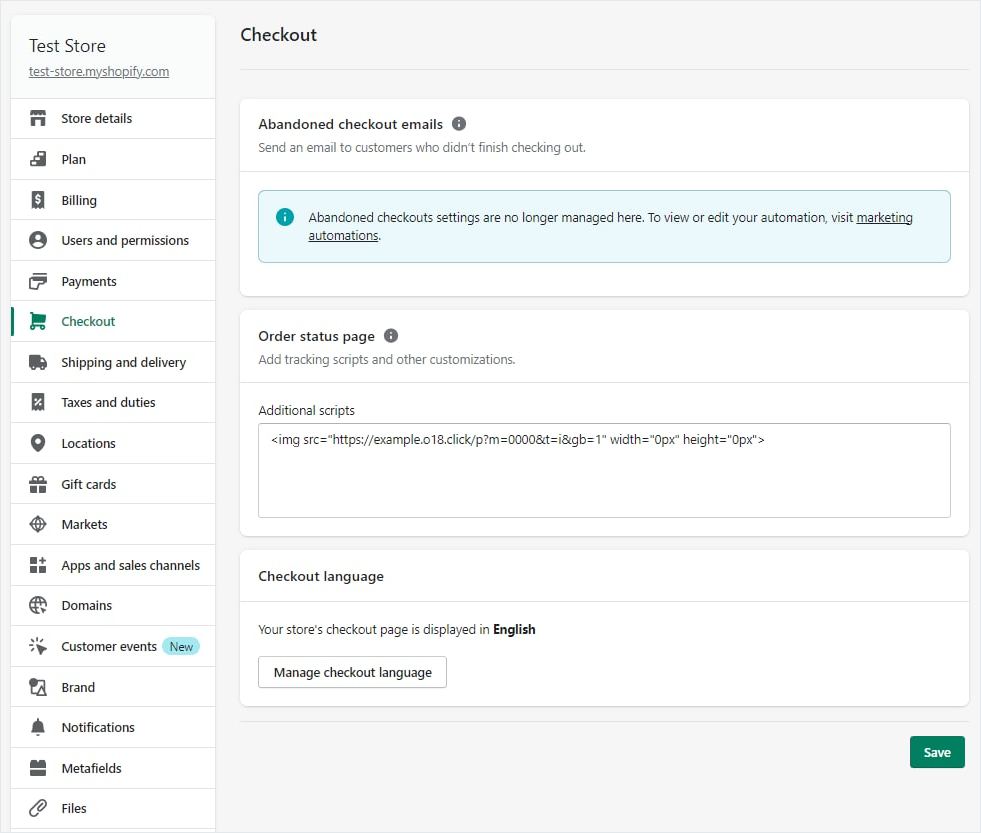 5\. 转到 **保存**
***
**完整教程 - Shopify 集成**
{% embed url="" %}
5\. 转到 **保存**
***
**完整教程 - Shopify 集成**
{% embed url="" %}