> For the complete documentation index, see [llms.txt](https://knowledgebase.offer18.com/llms.txt). Markdown versions of documentation pages are available by appending `.md` to page URLs; this page is available as [Markdown](https://knowledgebase.offer18.com/zh/wang-luo/zhang-hu-pei-zhi/smtp-she-zhi.md).

# SMTP 设置

#### 1. 前往账户 **»** 设置

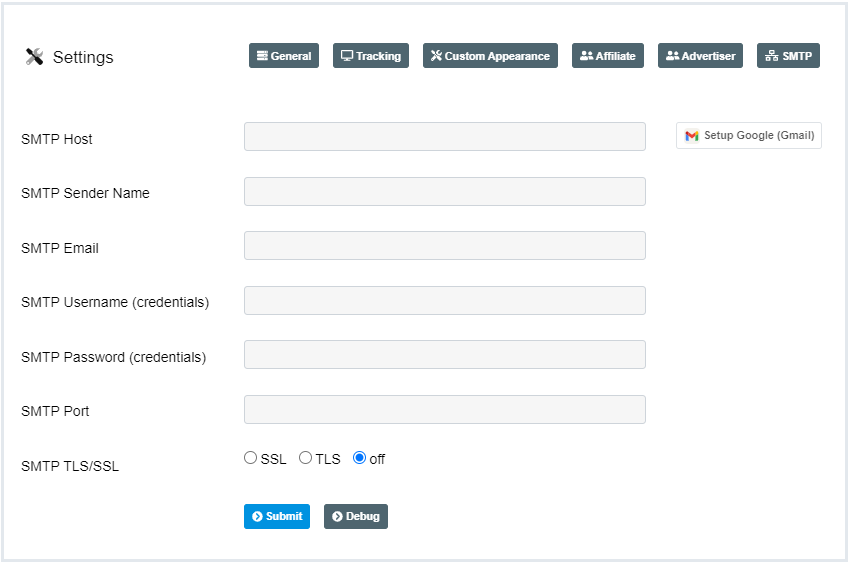
**2. 前往 SMTP 配置选项卡**

![](https://2731110321-files.gitbook.io/~/files/v0/b/gitbook-legacy-files/o/assets%2F-ME6HkHUCzlM0Mu33Q9W%2F-MMnOX9Cowr_VoabgClo%2F-MMnS69NpLm2b3z1e8Bv%2Fad5f3dc084c019ae62fe3fd478a26c46.gif?alt=media\&token=fe72df7f-340c-48d8-bc6c-f79728b70089)

***

#### SMTP 配置

<table data-header-hidden><thead><tr><th width="150"></th><th></th></tr></thead><tbody><tr><td><strong>字段</strong></td><td><strong>描述</strong></td></tr><tr><td>SMTP 主机</td><td>根据 SMTP 提供商设置的服务器地址</td></tr><tr><td>SMTP 用户名</td><td>用户姓名</td></tr><tr><td>SMTP 邮箱 </td><td>用户的电子邮件地址</td></tr><tr><td>SMTP 密码 </td><td>正在使用的电子邮件地址的密码</td></tr><tr><td>SMTP 端口</td><td>根据 SMTP 服务提供商设置的端口号</td></tr><tr><td>SMTP SSL / TLS</td><td>根据 SMTP 提供商连接端口所使用的连接类型</td></tr><tr><td>SMTP 发件人名称</td><td>从仪表板发送的提醒/邮件的发件人名称</td></tr></tbody></table>

<figure><img src="/files/2c5c668baa1375168c3899a9aabc105393824086" alt=""><figcaption></figcaption></figure>

***

### 使用 Google（Gmail）进行 SMTP 设置

1. 进入 "SMTP 配置选项卡" 中的 "设置 Google（Gmail）"

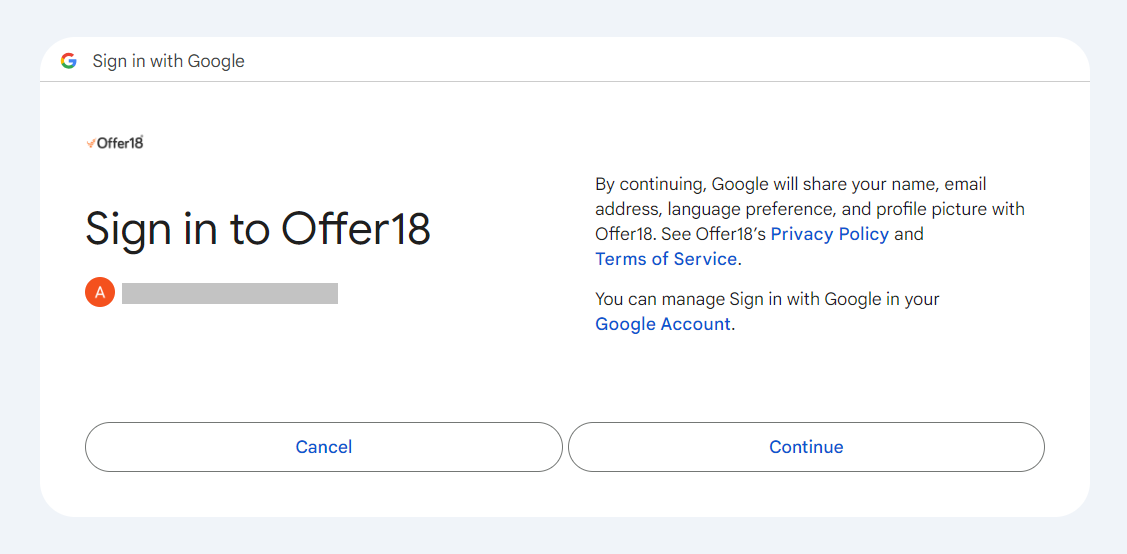
2. 如果你还没有登录，请登录你的 Google 账号，或者为 SMTP 选择你的 Google 账号，以确保你已登录到 Gmail 账号<br>

   <figure><img src="/files/d65636dc6577a1cac64392d1fcff6bffe673b5a8" alt=""><figcaption></figcaption></figure>

3. 点击 "继续" 登录 Offer18

4. 允许 Offer18 代表你发送电子邮件。（如有提示，请勾选复选框）

5. 所需的 SMTP 凭据将自动填充到 Offer18 的 SMTP 部分

6. 定义 "SMTP 发件人名称"

7. 前往提交

***

#### **测试邮件**&#x20;

用户可以通过发送测试邮件来验证其 SMTP 设置，以确保配置正常工作。

<div align="left" data-full-width="false"><figure><img src="/files/3e1171a7c13514d0e79a8de31012e11831096eff" alt=""><figcaption></figcaption></figure></div>

***

视频教程 - SMTP 配置

**GoDaddy**: :link: [<mark style="color:蓝色;">**https://www.youtube.com/watch?v=DLgTcAgxIIY**</mark>](https://www.youtube.com/watch?v=DLgTcAgxIIY)

**Zoho Mail：** :link: [<mark style="color:蓝色;">**https://www.youtube.com/watch?v=NSdI8NQvjS8**</mark>](https://www.youtube.com/watch?v=NSdI8NQvjS8)


---

# Agent Instructions
This documentation is published with GitBook. GitBook is the documentation platform designed so that both humans and AI agents can read, navigate, and reason over technical content effectively. Learn more at gitbook.com.

## Querying This Documentation
If you need additional information that is not directly available in this page, you can query the documentation dynamically by asking a question.

Perform an HTTP GET request on the current page URL with the `ask` query parameter:

```
GET https://knowledgebase.offer18.com/zh/wang-luo/zhang-hu-pei-zhi/smtp-she-zhi.md?ask=<question>
```

The question should be specific, self-contained, and written in natural language.
The response will contain a direct answer to the question and relevant excerpts and sources from the documentation.

Use this mechanism when the answer is not explicitly present in the current page, you need clarification or additional context, or you want to retrieve related documentation sections.